Introduction
Datasource public ID
When sending a message via the postMessage API, the host application must specify the target layer on the map. The layers on the map are represented by Datasources in HxGN Smart Sites. Each Datasource has an autogenerated public ID, which the administrator can consult and modify via the HxGN Smart Sites Admin Client. This public ID is used in postMessage API messages to indicate the intended Datasource.
Trusted Origins
The HxGN Smart Sites Client application only handles messages coming from trusted origins. Any messages that do not come from trusted origins are discarded. The trusted origins can be configured by the administrator in the site-settings section of the HxGN Smart Sites Admin Client.
Keycloak Configuration
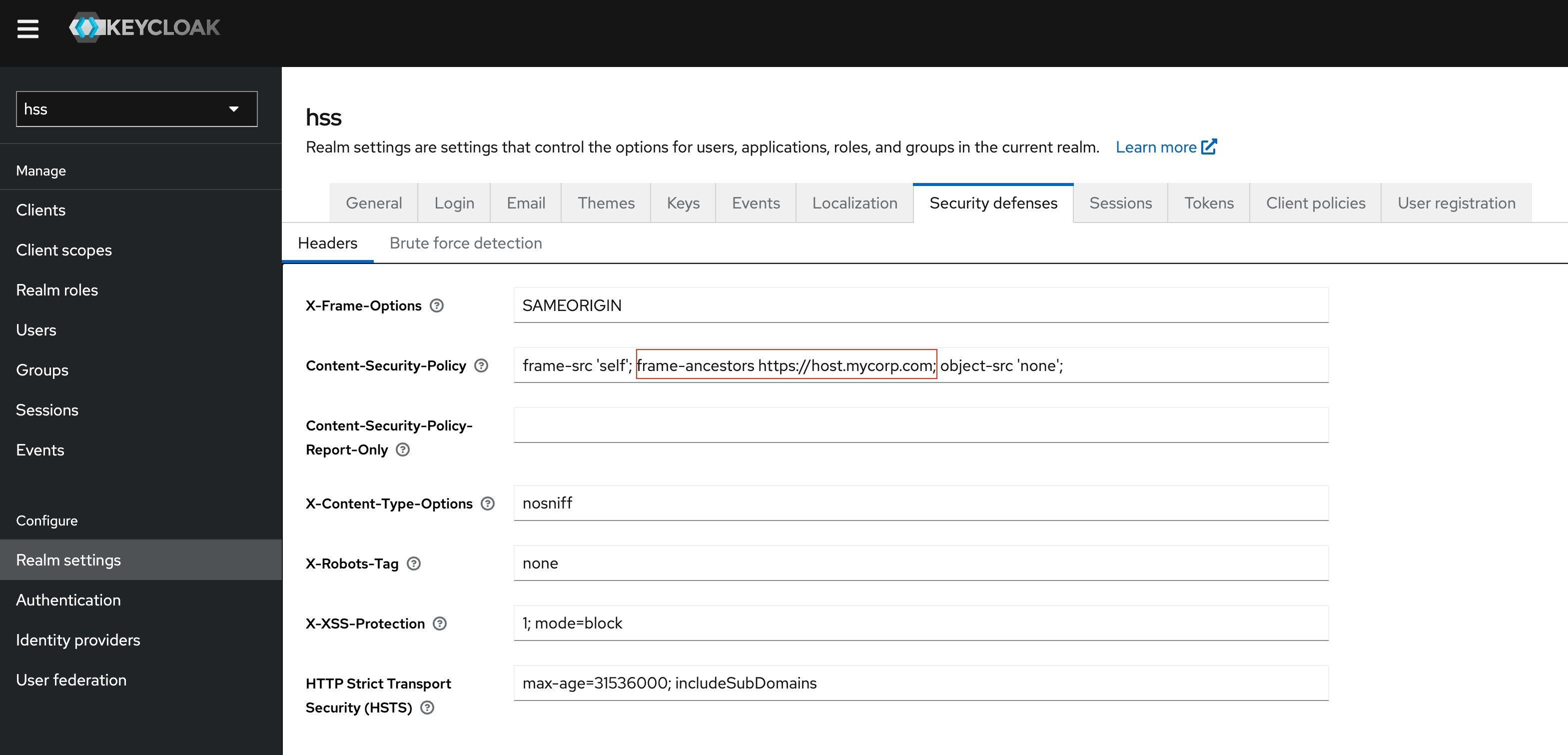
Users that are not logged in are redirected to Keycloak to log in. You must configure the Content-Security-Policy in Keycloak, to allow the log in page to be embedded.
- In Keycloak, go to the HxGN Smart Sites Realm Settings
- Select the Security Defenses tab.
- In the Content-Security-Policy field, configure the frame-ancestors directive to match the URL of the host
application.
So, for example, if the host application’s URL is
https://host.mycorp.com, and HxGN Smart Sites’s URL ishttps://hss.mycorp.com, the value of the directive should behttp://host.mycorp.com.